Accessibility links
  • Skip to main content
News Icon NEWS FILTER
All News Scams & Phishing Your Security Mobile Security Identity Theft Corporate Security Security Education Videos
Search Icon SEARCH
 

Email Icon SUBSCRIBE TO WEEKLY NEWSLETTER
Badbox Brings Drive By Malware to New Level in New Version
Facebook   X   LinkedIn   Email

Badbox Brings Drive By Malware to New Level in New Version

May 10, 2025

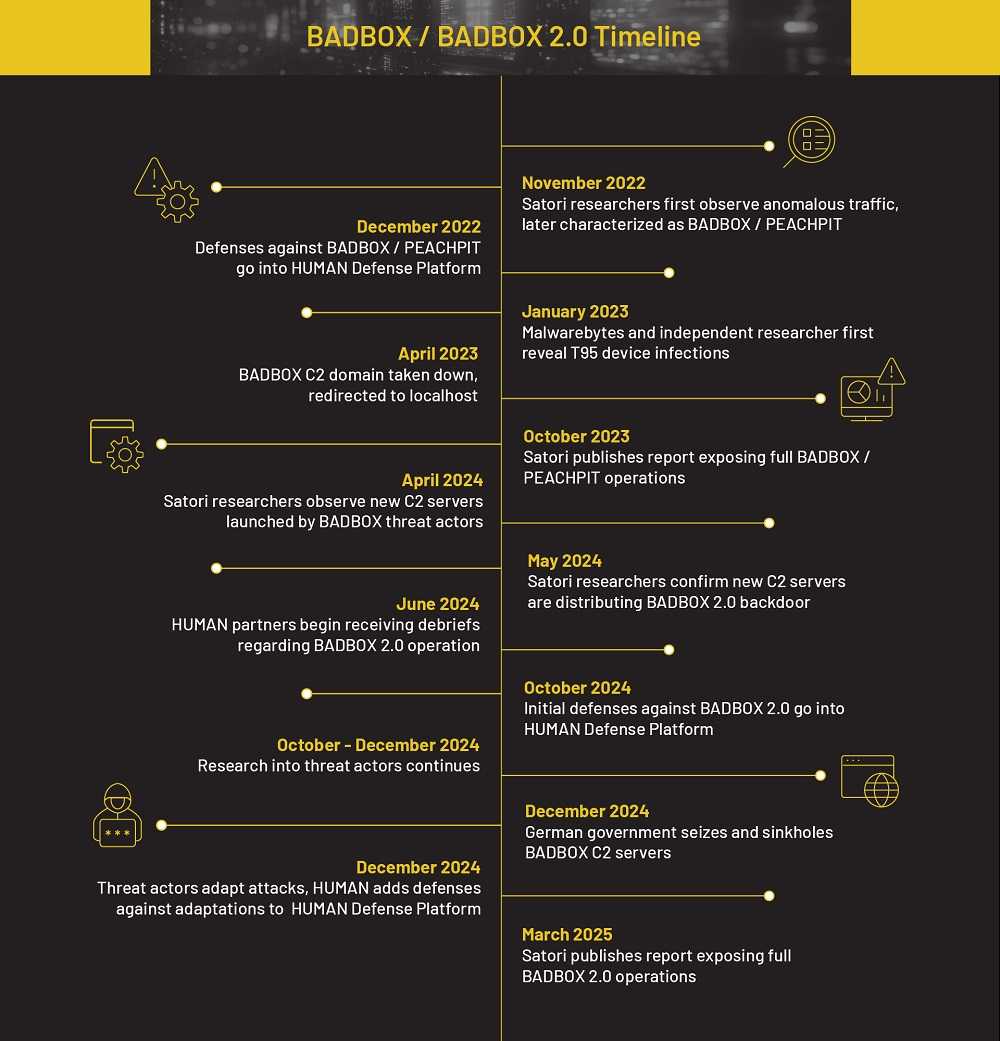
There’s a new twist on an earlier version of Badbox that’s infecting Android devices with its malware. Badbox 2.0 has arrived and it’s infecting everything from TV streaming devices used at home and in schools and businesses, to car infotainment systems. Badbox 2.0 is blowing up with help from drive-by downloads and victims who have no idea they just unleashed a “Badbox bomb.”
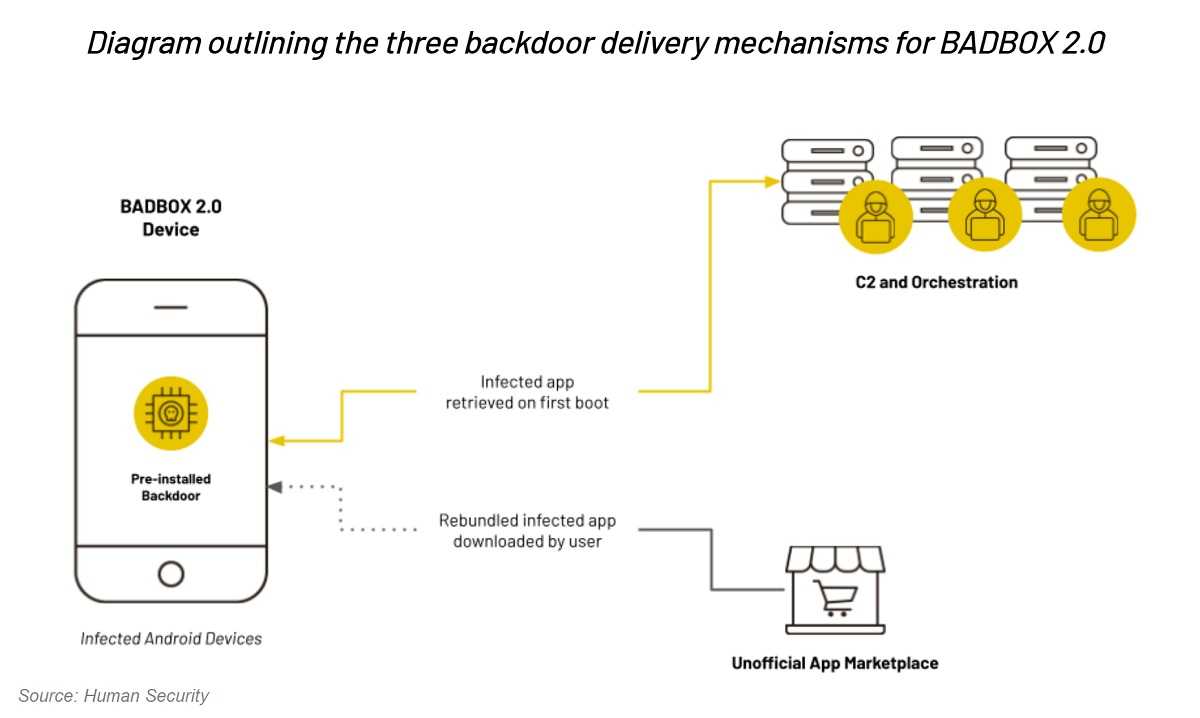
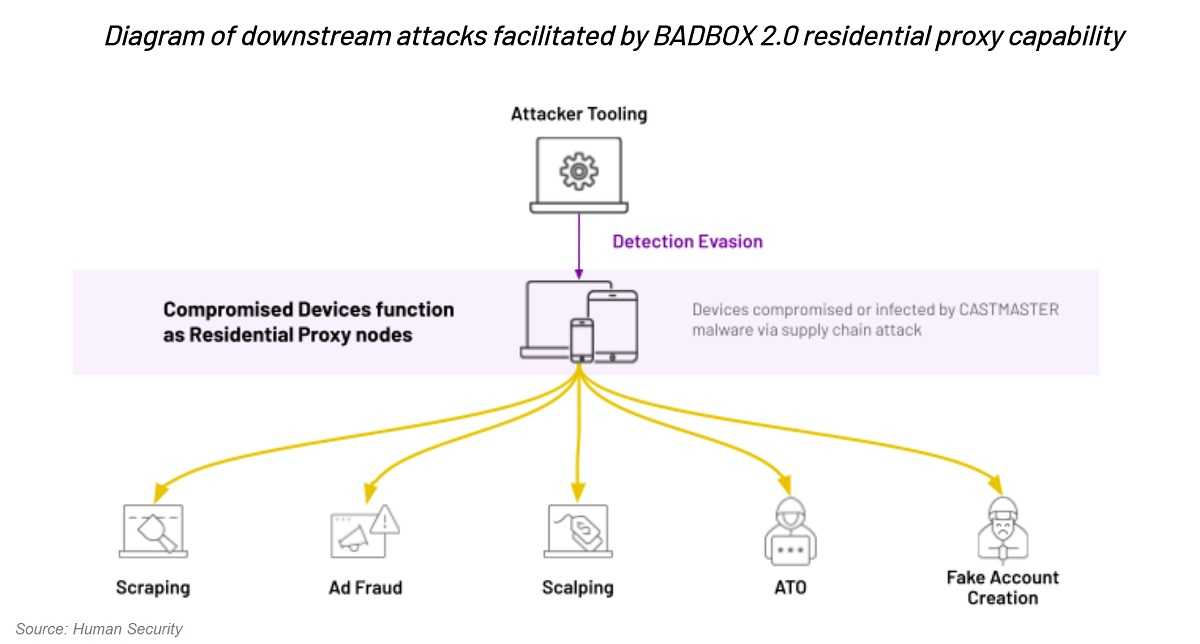
Security researchers say Badbox 2.0 signals a key change in tactics now focusing on traditional drive-by downloads. They also say a single bad actor isn’t behind this adware, but rather a China-based ecosystem of bad actors. The many interconnected members spread Badbox 2.0’s malicious pop-ups and click bait adware, all with the help of victims as proxies for their cybercrimes.

How Bad Boy Badbox 2.0 Works

Using common infection techniques helps this sneaky Bad Boy spread. By focusing on malware-infected software rather than infecting low-level firmware, Badbox 2.0 is thriving. The way this malware dupe’s users into downloading it is as varied as the many members of its network.
In one typical scheme, bad actors create an everyday, non-threatening app that passes Google Play Store’s malware scanning. A future victim shopping in a third-party store sees the app passed the vetting and assumes it’s safe to download. What they don’t know is the app is a duplicate filled with Badbox 2.0’s adware, and they might never know they were involved in a drive-by download.

Secure Tips

No matter what tricks Badbox 2.0’s bad actors use to draw victims into their web, there’s a few basic steps we can all take to avoid downloading malware. Sideloading third-party apps is very risky since these stores don’t inspect for malware and you’re rolling the dice using them. Although not perfect, download from official app stores since they scan all apps for malware before posting them. If you use anti-virus software, and you definitely should, keep it updated with the latest bug fixes and security patches.

Although it seems to be tougher staying safe online these days, don’t panic, that’s what hackers want us to do. Using a good dose of common sense and cyber-smarts helps everyone stay above malware like Badbox 2.0.


Keeping Your Mobile Device Apps Virus Free

Mobile Security

Keeping Your Mobile Device Apps Virus Free

It’s no secret that cybercriminals take advantage of anxiety-filled times and the current coronavirus pandemic (COVID-19) is most certainly one of those moments. The latest cybersecurity news reports that Android smartphones are being targeted with apps claiming to have up-to-date data on COVID-19. These infected apps promise the latest updates, but to unsuspecting users who download them, they also promise malware will surely be installed on your mobile device. READ FULL STORY

Is Sideloading Worth The Risk Of Downloading Malware?

Your Security

Is Sideloading Worth The Risk Of Downloading Malware?

It’s been well-known that sideloading apps is a risky proposition. Just ask the 20 million Aptoide users who recently learned their personally identifiable information (PII) was posted online by a hacker. Aptoide, a popular third-party app “discovery platform” had its database hacked earlier this month. The cybercriminal behind the hack claims that in addition to the 20 million exposed data files, there’s an additional 19 million files in their possession. Whether that’s true or not remains a mystery for now, but the Aptoide incident shows (in a huge way) why app sideloading is risky at best and is not recommended by security professionals. READ FULL STORY

Androids Hit With New Banking Malware

Mobile Security

Androids Hit With New Banking Malware

A new malware aiming at Android devices is getting away with bank robbery and more. For those Android devices v.13 and higher, BlankBot banking trojan is hiding in utility apps. This malware is still developing, but the tricks up its sleeve take total control over your device. Here’s what you need to know about this sneaky, stealthy stealer. This banking trojan creates custom, fake overlays stealing a username and password, payment card info, and other personally identifiable information (PII). But it doesn’t stop there. READ FULL STORY

Don't Google Your Way Into Being Hacked

Mobile Security

Don't Google Your Way Into Being Hacked

Just when you thought it was safe to Google, it turns out that some search terms can get you hacked. Called “SEO poisoning,” hackers have found ways to turn your Google searches into helping them, and that’s never a good thing. Hackers are ready and waiting for users to Google popular search terms. When they're at the top of the list, they are more likely to be trusted. But don't click without verifying. It could lead to malware, stolen PII, or ransomware. READ FULL STORY


Close
Fraud News & Alerts!

Keep up with the latest cyber security news through our weekly Fraud News & Alerts updates. Each week you will receive an email containing the latest cyber security news, tips and breach notifications.


You're all set!

You will receive your first official security update email within the next week.

A welcome email has also just been sent to you. If you do not receive this email within the next few minutes, please check your Junk box or spam filter to confirm our emails are not being blocked.


Help  
Enter any word or words you like.        

The email newsletter will arrive from news@stickleyonsecurity.com


Loading
Please wait...