Accessibility links
  • Skip to main content
News Icon NEWS FILTER
All News Scams & Phishing Your Security Mobile Security Identity Theft Corporate Security Security Education Videos
Search Icon SEARCH
 

Email Icon SUBSCRIBE TO WEEKLY NEWSLETTER
Fake Windows Crash Screen Tricks People Into Installing Malware
Facebook   X   LinkedIn   Email

Fake Windows Crash Screen Tricks People Into Installing Malware

March 3, 2026

Every Windows computer user has seen, has heard horror stories about, or knows firsthand the dreaded Blue Screen of Death (BSOD). It’s that scary blue screen your Windows PC shows when something really goes wrong and your computer just stops working. Normally, when a real BSOD appears, all you can do is restart, cross your fingers, and hope everything is okay. According to Microsoft, it’s a sign of a system crash, not something you’re supposed to “fix.”

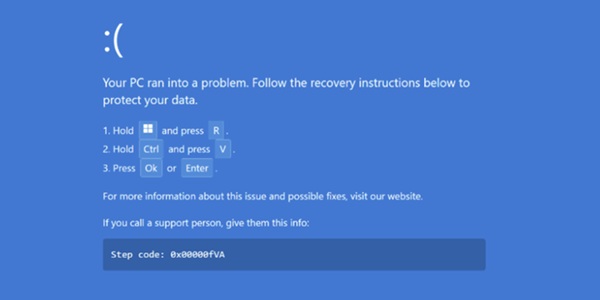
But cybercrooks have found a sneaky way to abuse that familiar fear. In a recently uncovered campaign called “PHALT#BLYX,” attackers send phishing emails that look like alerts from hotel booking sites or third-party travel booking websites (think Kayak or Expedia). Those messages urge recipients to click a link to check a reservation or a cancellation. Once clicked, a fake CAPTCHA appears and then the victim’s browser gets taken to a fake booking page that quickly shows what looks like a real BSOD crash.
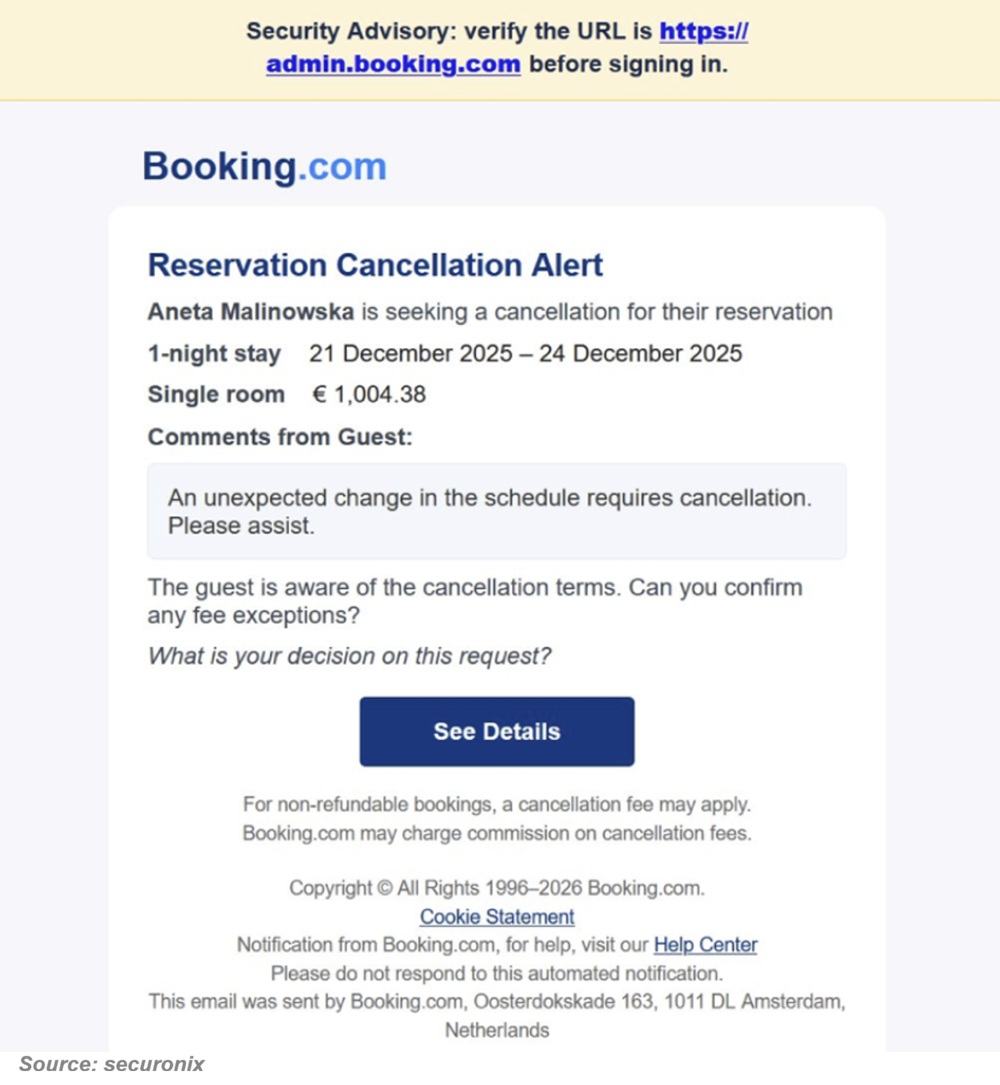
The fake BSOD doesn’t come from your computer, however. It’s just a webpage designed to look like a “click fix” tactic. These trick users into copying and pasting something or typing a command into a window and it’ll fix it. It will then give “instructions” on how to fix the problem by copying and pasting a malicious script into the Windows run dialogue box. That action leads the user to paste and run the DCRat malware on their own machine. Once that malicious software is running, attackers can spy on the victim, steal passwords or sensitive data, and even disable security features.

Everyone may be at risk

Ok, nearly everyone who uses a Windows PC might panic at a scary crash message. However, workers in hospitality or other industries targeted by the phishing emails, are especially at risk here. But you can watch for them.

Keep the peepers open.

  • Never trust sudden crash screens that ask you to “fix” things yourself. This is especially true if you really don’t know what you’re doing.
  • Ignore emails with urgent links from companies you didn’t contact. Urgency is one of the key indicators of a cyberattack.
  • Close suspicious websites instead of following their instructions. Just click that x or whatever it is in your browser and shut it down. Try again later.
  • Keep your security software up to date.

Stay calm and think twice before acting. Real crashes don’t offer recovery steps on a webpage.


Time's Up For Windows 10: The End Of Security Updates

Your Security

Time's Up For Windows 10: The End Of Security Updates

It’s coming soon! A major security event affecting hundreds of millions of computers worldwide comes to fruition in October 2025a. Microsoft is officially ending support for Windows 10. While you still may prefer to stick with the known operating system rather than update, you can have some problems. That’s because there will be no more software updates from Windows Update, technical assistance, or security fixes—and that could leave you in a lurch! READ FULL STORY

Sneaky Email Phishing Uses Corrupt MS Word Files

Scams & Phishing

Sneaky Email Phishing Uses Corrupt MS Word Files

Always looking for new ways to swindle us, hackers are using purposely corrupted Word files to hook unsuspecting users. The success rate of this email phishing attack is nearly 100%, so knowing what to look for before you get hooked can help prevent this latest cybercrime. Any.Run, a malware hunting firm, found corrupt Word files attached to emails, infected with malware that bypass Microsoft's malware checks. Even worse, this scam uses Microsoft’s own document recovery feature to open the corrupt file. READ FULL STORY

Mac Users Spied On with Microsoft Apps

Mobile Security

Mac Users Spied On with Microsoft Apps

No one likes the idea that their device may be watching them. And now, Apple recently revealed that could be the case with their MacOS users. It was discovered that hackers are spying on Mac users through certain Microsoft apps and potentially overtaking their device. All Mac fans should know what’s going on with this latest security vulnerability. The cybersecurity pros at Cisco Talos found eight vulnerabilities in various popular Microsoft apps including Word, Outlook, and PowerPoint. READ FULL STORY

Phony Voicemail Links Steal Employee Credentials From Office 365 And Outlook Users

Scams & Phishing

Phony Voicemail Links Steal Employee Credentials From Office 365 And Outlook Users

Most of us know phishing emails and fake texts are a hacker’s calling card for stealing valuable PII. But recently, researchers at Zscaler cloud security sounded the alarm about an unusual malware campaign using voicemail-themed email phishing as the primary hook for cyberattacks. It’s only after Zscaler fell victim to this campaign that the company felt compelled to study it further. Zscaler finds this cybercrime targets employees in the U.S. using Microsoft Office 365 and the Outlook email service. READ FULL STORY

What You See Is Not What You Get; Phishing Attack Skips Email Security Measures

Scams & Phishing

What You See Is Not What You Get; Phishing Attack Skips Email Security Measures

It’s no surprise that phishing is still prevalent in the cyber world. In fact, it remains the top way malware gets onto devices, and it still excels at getting people to give up their personal information. Phishing scams, and they are aplenty, aim to deceive individuals into divulging sensitive information such as passwords, payment card details, or all other kinds of personal data; some that you don’t even think is all that useful to someone trying to scam you. READ FULL STORY


Close
Fraud News & Alerts!

Keep up with the latest cyber security news through our weekly Fraud News & Alerts updates. Each week you will receive an email containing the latest cyber security news, tips and breach notifications.


You're all set!

You will receive your first official security update email within the next week.

A welcome email has also just been sent to you. If you do not receive this email within the next few minutes, please check your Junk box or spam filter to confirm our emails are not being blocked.


Help  
Enter any word or words you like.        

The email newsletter will arrive from news@stickleyonsecurity.com


Loading
Please wait...