Hackers have begun employing a new annoyance technique to steal Google account passwords. This tactic, called credential flushing, relies on getting malware onto a device that locks the system into “kiosk mode.” In this mode, users are prevented from doing anything else without providing their account credentials. Once the victim provides them, hackers can log into the victim’s Google account and steal personal information or further compromise their online security.
Like the technique used in the past, prompt bombing, this method also relies on user-frustration. Once the malware, StealC, makes its way onto the device, it locks into full-screen mode with the only screen the user is able to access being the Google account login screen. The user has only one-way out: Enter their login and password.
Prompt bombing involves wearing you out. They keep overwhelming the victim with multiple 2FA (two-factor authentication) prompts or pop-ups, bombarding them with repeated notifications until they unintentionally approve the login attempt.
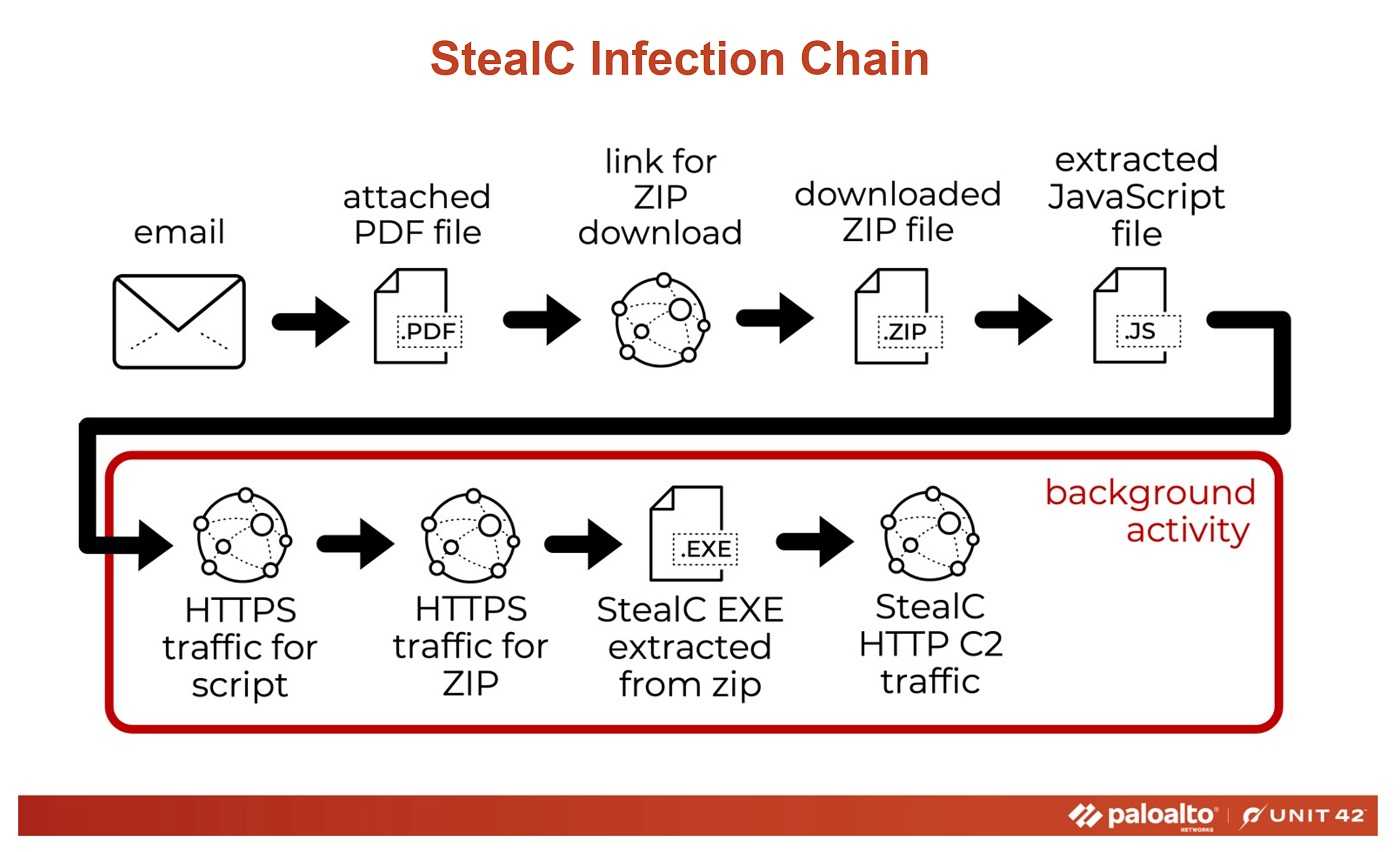
The method also capitalizes on user frustration and fatigue. Simply, you just get tired of seeing those prompts. As a result, many people may mistakenly assume that their device is malfunctioning or that something is wrong with the system. In an effort to stop the relentless notifications, they may inadvertently click "Approve," giving attackers immediate access to their Google account.
To avoid falling victim to these techniques, users can take several precautionary measures:
 Stay Calm: If you get locked into kiosk mode or receive a barrage of 2FA prompts, do not enter credentials or approve any requests, especially if you weren’t actively trying to log in. This could be a sign of an ongoing attack.
- Change Your Password: If you suspect an attacker is targeting your account, change your password immediately. Go into your account on another device and go directly to the account without using a link. Make sure to use a strong, unique password for every account, and avoid reusing passwords across services.
- Enable Stronger 2FA Options: Use more secure forms of two-factor authentication, such as hardware security keys, when possible. However, using some form of 2FA is always better than using none.
- Review Devices Logged into Your Account: Regularly check your account for any unfamiliar devices that may have logged in, and revoke access if needed. You can find this information in your browser settings.
- Never use your Google, or any other account credentials as your login for some other account. It might be a little more cumbersome to use separate ones for everything, but remember if one account is compromised, the others with the same credentials are at risk too.
- Look out for phishing. Receiving unexpected links or attachments is a good sign of phishing and a good way to get malware on your device. Watch for typos, grammar mistakes, and blurry graphics too. And if you don’t know the sender, don’t click anything.
Need to get out of “kiosk” mode? Well, you can try hotkey combos of Alt + F4, Ctrl + Shift + Esc, Ctrl + Alt +Delete, and Alt +Tab on Windows devices, which could enable you to get to your desktop and launch the Task Manager. This may allow you to kill the browser. If not, there’s always the “Hail Mary” method; You can shut the machine down completely and restart it. However, you’ll need to reboot into safe mode to do a full system scan to ensure you’re not just restarting the malware.
If you need more help, consult with a technical support professional or someone you trust. And of course, always keep anti-virus software on all of your devices and keep it updated. While it won’t catch all of the malware, it will certainly catch a lot of it.

 SUBSCRIBE TO WEEKLY NEWSLETTER