Accessibility links
  • Skip to main content
News Icon NEWS FILTER
All News Scams & Phishing Your Security Mobile Security Identity Theft Corporate Security Security Education Videos
Search Icon SEARCH
 

Email Icon SUBSCRIBE TO WEEKLY NEWSLETTER
That Update You've Been Ignoring Might Be the Most Important One
Facebook   X   LinkedIn   Email

That Update You've Been Ignoring Might Be the Most Important One

October 13, 2026

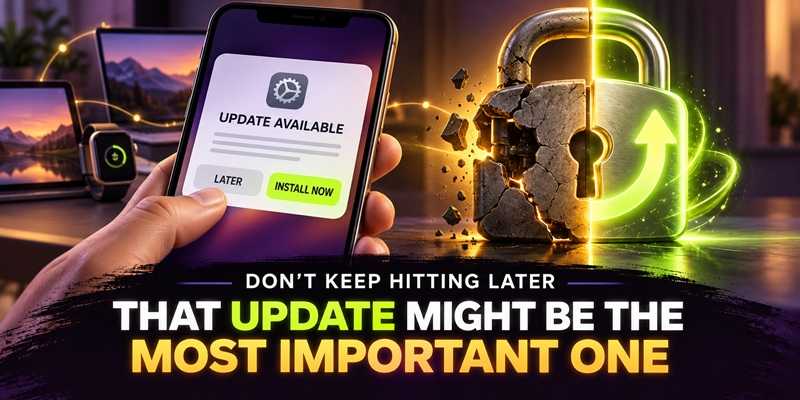
Let's face it. When you see that little dot on your phone that announces that a software update is available, "I'll do it later" is an awfully tempting response. However, later becomes tomorrow. Tomorrow becomes next week, and suddenly your phone is running software that is several versions behind. That, however, can be a security problem.

Apple's most recent iOS update, iOS 26.6.1, was released August 17 and specifically provides security fixes for iPhones and iPads. Apple also released iOS 18.7.10 for some older iPhone models.

Apple doesn't always explain every security issue in everyday language, and that's okay. You don't need to understand the technical details to understand the important part: The update fixes problems that could potentially be used against your device.

Updates Aren't Just About New Features

We tend to think of updates as the things that bring us new emojis, prettier screens, or another feature we didn't ask for. But security updates are often working quietly in the background. They do important tasks, such as fix weaknesses in the operating system, browsers, apps, and other software that criminals may try to exploit. Apple isn't alone. Microsoft, Google, Samsung, and virtually every other technology company regularly release security updates for the same reason.

Don't Wait for Something to Go Wrong

There is never a good time for something to go wrong on your device. But, one of the worst times to discover that it needs a security update is after someone has already taken advantage of the weakness.Think of an update as fixing a broken lock. You don't wait until someone walks through the door to decide the lock should probably be repaired.

The same principle applies to your phone, tablet, computer, smartwatch, and other connected devices.

The Bottom Line

When your device tells you an update is available, don't automatically hit “Later." Take the time to backup your current device and just install it. If possible and reasonable, turn on automatic updates so your devices can take care of many of these fixes without requiring you to remember.

That little notification may not be exciting, but sometimes the most boring button on your phone is the one doing the most to keep you safe.


Fake Update Ads Steal Your Passwords

Scams & Phishing

Fake Update Ads Steal Your Passwords

We know the cyber-cheats are always out there using every trick in the book to steal our money, identities and whatever else they can get their hands on. So, the next time you’re alerted to a software update, especially one appearing in an online ad, it’s time to step back and take a closer look before tapping “Download.” A latest malvertising campaign lures users into downloading a fake software update. The now custom, improved malware is being used at this very moment and surely will continue doing damage well into the new year. READ FULL STORY

Simple Habits That Make You a Tougher Target for Cybercrooks

Your Security

Simple Habits That Make You a Tougher Target for Cybercrooks

It’s already well into the new year and a fresh year usually brings fresh goals—exercise more, spend less, maybe try a new hobby. But one resolution that deserves a permanent spot on everyone’s list is tightening up your personal cybersecurity. Cyberthreats don’t take holidays, and scammers aren’t slowing down. In fact, they’re getting bolder, trickier, and faster at finding new ways to get into your accounts and steal your money or data. READ FULL STORY

Think Your Business Is Too Small For Hackers? It’s Time To Think Again

Corporate Security

Think Your Business Is Too Small For Hackers? It’s Time To Think Again

There’s a false sense of security when SMB owners believe hackers aren’t interested in a small company. The assumption is that bad actors will just move on to bigger and better targets with much more to steal. Unfortunately, that really couldn't be more wrong. There’s plenty of valuable data worth stealing from small businesses. Hijacked information like credit card details, passwords, and other PII is equally as useful and destructive, and if stolen can also lead to supply chain attacks, where info stolen from smaller businesses can be used to catch bigger fish. READ FULL STORY

Don’t Give Email Permissions To Bogus Upgrade App

Scams & Phishing

Don’t Give Email Permissions To Bogus Upgrade App

Email phishing campaigns involve a variety of hacker goals, most of which want you to install some type of malware on your device. Now there’s a new phishing campaign making the rounds that involves Microsoft Office 365 users and a bad actor with a fake app called “Upgrade.” The app asks for control over your email account and the authorizations and permissions that go with it. Recently, Microsoft’s Security Intelligence team sent a tweet warning this campaign is now targeting hundreds of organizations. READ FULL STORY

Your Apple ID Has Been Suspended—Or Has It?

Scams & Phishing

Your Apple ID Has Been Suspended—Or Has It?

In recent weeks, a new phishing scam emerged targeting Apple users, dubbed the "Apple ID suspended" scam. This latest scam employs a deceptive tactic to trick users into providing sensitive information, such as their valuable Apple login credentials and other personal details. For this one, it creates a sense of urgency and fear if the user doesn’t take action; a hallmark for these types of threats. Here’s how you can spot this scam for what it is and what you can do to prevent it from taking a bite out of you. READ FULL STORY


Close
Fraud News & Alerts!

Keep up with the latest cyber security news through our weekly Fraud News & Alerts updates. Each week you will receive an email containing the latest cyber security news, tips and breach notifications.


You're all set!

You will receive your first official security update email within the next week.

A welcome email has also just been sent to you. If you do not receive this email within the next few minutes, please check your Junk box or spam filter to confirm our emails are not being blocked.


Help  
Enter any word or words you like.        

The email newsletter will arrive from news@stickleyonsecurity.com


Loading
Please wait...