Accessibility links
  • Skip to main content
News Icon NEWS FILTER
All News Scams & Phishing Security Education Videos Mobile Security Your Security Education Identity Theft Corporate Security
Search Icon SEARCH
 

Email Icon SUBSCRIBE TO WEEKLY NEWSLETTER
Critical Malware Threat Targets Gmail and Outlook
Facebook   X   LinkedIn   Email

Critical Malware Threat Targets Gmail and Outlook

November 8, 2025

Recently, a critical email threat targeting Gmail and Outlook users has come to light. Security researchers have identified malware campaigns distributing VIP Keylogger and 0bj3ctivityStealer threats, which can compromise these users. They are designed to steal PII and other information by gathering keystrokes and taking screenshots.

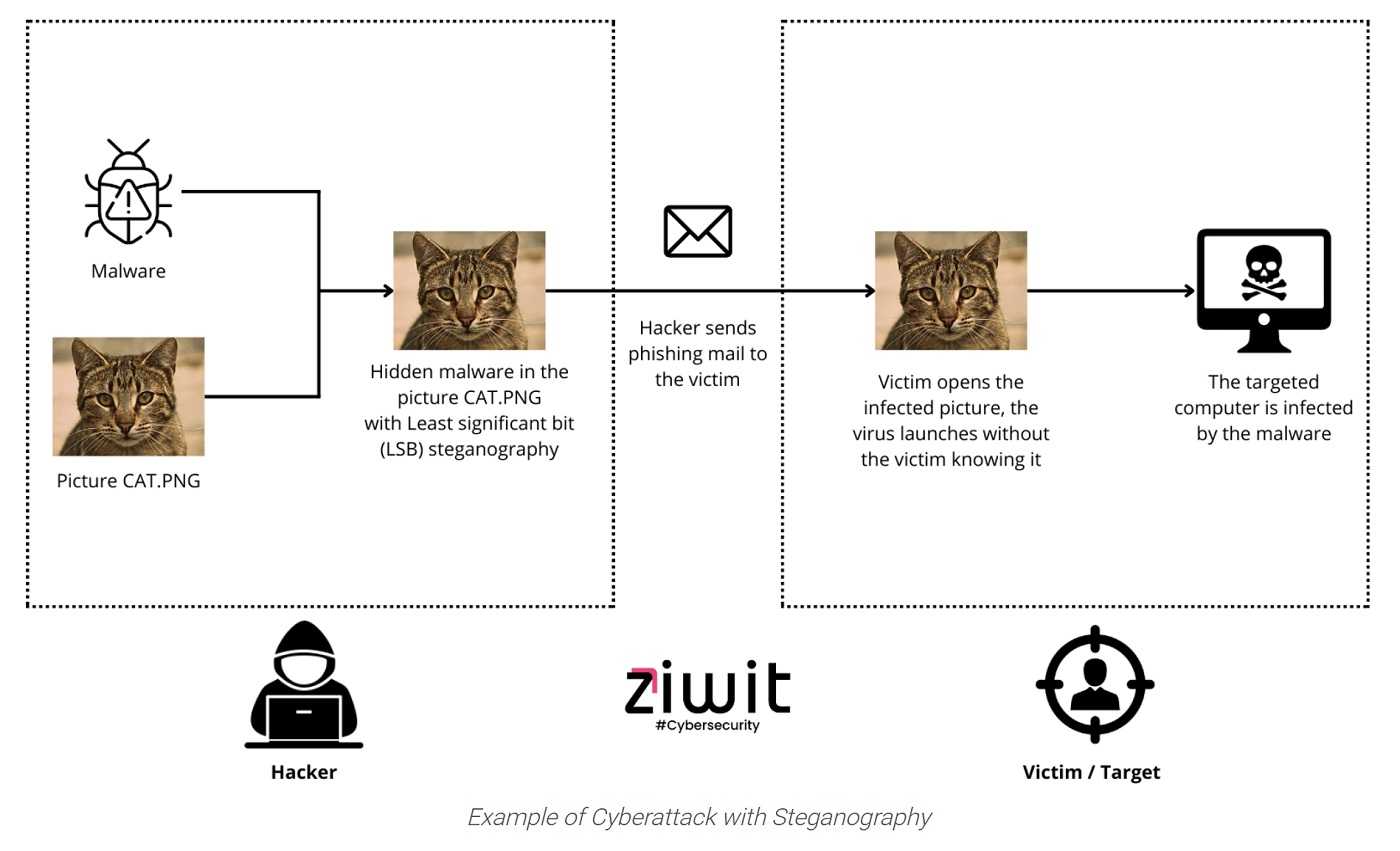
HP Wolf Security is warning of a malware threat that hides inside images that are delivered to the inboxes of Gmail and Outlook users. Since most of us likely have an email account with one or both of these providers, everyone should stay alert.

The malware poses as typical items you’d see in your email: invoices, purchase orders, and requests for quotations (RFQ). If these are activated, the malware is downloaded and set off to do its dirty deeds.
What can you do? As always, use good anti-phishing know-how:

  • Avoid opening attachments or clicking on links from unknown or unexpected sources, as they may contain malware.
  • Regularly update your operating system, email client, and security software to patch vulnerabilities that could be exploited by malware.
  • Use complex passwords and avoid reusing them across multiple accounts to minimize the risk of credential theft.
  • Activate 2FA on your email and other critical accounts when it’s available. This adds an extra layer of security against unauthorized access.
  • Keep abreast of the latest security threats and best practices.

As for what the companies are doing, a spokesperson from Google said, “we developed several ground-breaking AI models that significantly strengthened Gmail cyber-defenses, including a new large language model that we trained on phishing, malware and spam.” Microsoft has stated that “all Outlook.com users benefit from spam and malware filtering. For Microsoft 365 Family and Microsoft 365 Personal subscribers, Outlook.com performs extra screening of the attachments and links in messages you receive.” This should apply for all Microsoft 365 Family and Microsoft 365 Personal subscribers with email accounts ending in outlook.com, hotmail.com, live.com, and msn.com.


Fake Update Ads Steal Your Passwords

Scams & Phishing

Fake Update Ads Steal Your Passwords

We know the cyber-cheats are always out there using every trick in the book to steal our money, identities and whatever else they can get their hands on. So, the next time you’re alerted to a software update, especially one appearing in an online ad, it’s time to step back and take a closer look before tapping “Download.” A latest malvertising campaign lures users into downloading a fake software update. The now custom, improved malware is being used at this very moment and surely will continue doing damage well into the new year. READ FULL STORY

Meerkats Shapeshift to Steal Logins

Scams & Phishing

Meerkats Shapeshift to Steal Logins

Morphing Meerkat is a recently identified phishing-as-a-service (PhaaS) platform that employs advanced techniques to deceive users and steal credentials. Discovered by cybersecurity firm Infoblox, this platform exploits Domain Name System (DNS) mail exchange (MX) records to dynamically generate fake login pages, impersonating over 100 brands, including Gmail, Outlook, AOL, Office 365, and Yahoo. The attack initiates when a victim clicks on a malicious link embedded in a phishing email. READ FULL STORY

Keeping Your Mobile Device Apps Virus Free

Mobile Security

Keeping Your Mobile Device Apps Virus Free

It’s no secret that cybercriminals take advantage of anxiety-filled times and the current coronavirus pandemic (COVID-19) is most certainly one of those moments. The latest cybersecurity news reports that Android smartphones are being targeted with apps claiming to have up-to-date data on COVID-19. These infected apps promise the latest updates, but to unsuspecting users who download them, they also promise malware will surely be installed on your mobile device. READ FULL STORY

Agencies Warning Gmail, Outlook, and Apple Mail Users of Fire-Related Scams

Scams & Phishing

Agencies Warning Gmail, Outlook, and Apple Mail Users of Fire-Related Scams

As with all catastrophes and other disasters and big events, scammers seem to come out of the ashes to take advantage of empathizers among us. In the aftermath of the recent California wildfires, cybercriminals are exploiting the situation to target users of Apple Mail, Gmail, and Outlook with sophisticated scams. These malicious actors are leveraging the urgency and emotional impact of the disaster to deceive well-intentioned individuals. READ FULL STORY

Phony Voicemail Links Steal Employee Credentials From Office 365 And Outlook Users

Scams & Phishing

Phony Voicemail Links Steal Employee Credentials From Office 365 And Outlook Users

Most of us know phishing emails and fake texts are a hacker’s calling card for stealing valuable PII. But recently, researchers at Zscaler cloud security sounded the alarm about an unusual malware campaign using voicemail-themed email phishing as the primary hook for cyberattacks. It’s only after Zscaler fell victim to this campaign that the company felt compelled to study it further. Zscaler finds this cybercrime targets employees in the U.S. using Microsoft Office 365 and the Outlook email service. READ FULL STORY


Close
Fraud News & Alerts!

Keep up with the latest cyber security news through our weekly Fraud News & Alerts updates. Each week you will receive an email containing the latest cyber security news, tips and breach notifications.


You're all set!

You will receive your first official security update email within the next week.

A welcome email has also just been sent to you. If you do not receive this email within the next few minutes, please check your Junk box or spam filter to confirm our emails are not being blocked.


Help  
Enter any word or words you like.        

The email newsletter will arrive from news@stickleyonsecurity.com


Loading
Please wait...