Accessibility links
  • Skip to main content
News Icon NEWS FILTER
All News Scams & Phishing Security Education Videos Mobile Security Your Security Education Identity Theft Corporate Security
Search Icon SEARCH
 

Email Icon SUBSCRIBE TO WEEKLY NEWSLETTER
Researcher Reveals Clickjacking Flaw That Can Spill Your Secrets
Facebook   X   LinkedIn   Email

Researcher Reveals Clickjacking Flaw That Can Spill Your Secrets

January 6, 2026

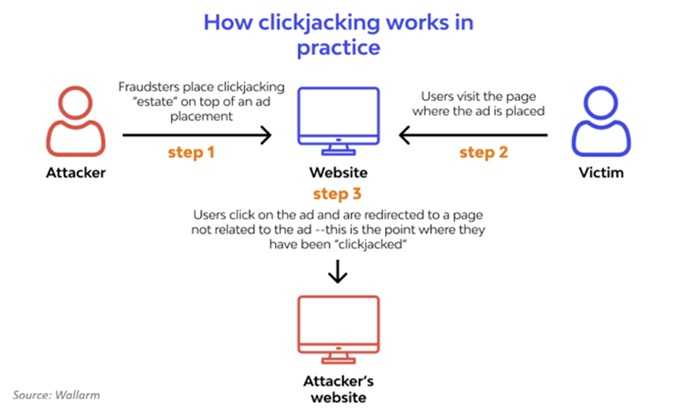
Password managers are, while not the best way, not a bad way to store all the numerous passwords you need to have these days.  However, some of the confidence in that was recently tested. At the most recent DEF CON conference, independent security researcher Marek Tóth dropped a bombshell—your trusty password manager may not be as secure as you think. Tóth showed how a sneaky attack called DOM-based extension clickjacking can trick your browser into autofilling not just usernames and passwords, but even your 2FA codes, passkeys, credit card details, and personal info—all with a single click.

Here’s what’s up:

  • Attackers build a website that looks harmless—maybe with a cookie pop-up or a login banner. But hidden beneath are invisible password manager controls. One careless click and bam—your autofill info gets sent straight to the bad guys.
  • Tóth tested 11 browser-based password managers and found all of them exposed—at least initially. That includes big names like 1Password, Bitwarden, Enpass, iCloud Passwords, LastPass, and LogMeOnce.
  • Usernames, passwords, credit cards, 2FA codes, passkeys—you name it, it can be snatched with a single click.
What you should do now:

  • Turn off autofill in your password manager and swap to copy-and-paste for logins. Yes, it’ll take a bit longer, but it’ll also keep your login information safe for now.
  • If you're on a Chrome browser, change your password-manager extension’s site access to “on-click” only, so it only activates when you give it the go-ahead.
  • Keep your extensions updated—some companies have already patched the flaw; others are still working on fixes. So when you see the update notification, get right on it.

Until all apps are patched, stay sharp—one click shouldn’t cost you your data.


Slow Browser? It May Have Been Hijacked By Malware

Your Security

Slow Browser? It May Have Been Hijacked By Malware

Before calling your internet provider to complain about a slow browser think about this:  It’s no secret malware loves to hide in all kinds of things like adware, spyware, scareware, and fake browser updates. Finding your browser is not only slow, but also acting strangely is a sign something isn’t quite right. If after going through the internet provider's standard toolbox for troubleshooting doesn't help, it’s time to think about malware. READ FULL STORY

New Clickjack Attacks: Where You Double-Click Matters

Scams & Phishing

New Clickjack Attacks: Where You Double-Click Matters

Call them sneaky, devious, underhanded, cunning, and conniving. Clickjack attacks are all that and more. And now there’s a new twist on this highly successful cybercrime. All it takes is one wrong double-click that puts this crime into motion, leaving countless victims unaware they’ve been duped. That is, until it’s too late. Here’s what you need to know now about this new type of attack on your clicks. This new double-click version gets past clickjacking protections put on the single click attacks. READ FULL STORY

Avoiding Popup Pain from Malicious Chrome Extensions

Scams & Phishing

Avoiding Popup Pain from Malicious Chrome Extensions

There are highly malicious browser extensions making the rounds and affecting Google Chrome and its users. Researchers at SquareX found just one click on these extensions lets cybercriminals clean out password managers, banking info, crypto wallets, and other sensitive data. Until Google protects against this latest hack, it’s every user’s responsibility to protect themselves. According to SquareX, a vulnerability in the way Chrome is built allows this particular hack to thrive. READ FULL STORY

Syncjacking Jacks Up Chrome Browsers

Your Security

Syncjacking Jacks Up Chrome Browsers

Google Chrome just can’t catch a break. Unfortunately, it’s in the cybersecurity news again regarding a new attack which is being referred to as “browser syncjacking,” by the company that describes it, SquareX. It involves something we’ve been warning about over the years: browser extensions. However, if you extend Chrome with this one, you will send all your saved browser data, including your passwords, to attackers and take over your Chrome profile and of course, there's more. READ FULL STORY

Overlays For Androids For Criminal Convenience

Mobile Security

Overlays For Androids For Criminal Convenience

Android Overlays are a powerful feature in the Android operating system. Theses allow apps to display content over other apps or over the system user interfaces. Ultimately this results in the user experience being more, well, user-friendly. So why is it important? This is useful in many ways, such as for displaying persistent notifications, those cheeky Android chat heads that float around the screen, or for using accessibility features. But those handy capabilities can also be misused by cybercriminals to create deceptive interfaces, tricking you. READ FULL STORY


Close
Fraud News & Alerts!

Keep up with the latest cyber security news through our weekly Fraud News & Alerts updates. Each week you will receive an email containing the latest cyber security news, tips and breach notifications.


You're all set!

You will receive your first official security update email within the next week.

A welcome email has also just been sent to you. If you do not receive this email within the next few minutes, please check your Junk box or spam filter to confirm our emails are not being blocked.


Help  
Enter any word or words you like.        

The email newsletter will arrive from news@stickleyonsecurity.com


Loading
Please wait...