Accessibility links
  • Skip to main content
News Icon NEWS FILTER
All News Scams & Phishing Security Education Videos Mobile Security Your Security Education Identity Theft Corporate Security
Search Icon SEARCH
 

Email Icon SUBSCRIBE TO WEEKLY NEWSLETTER
Going Up…Again. PayPal and Docusign Scams Still on the Rise
Facebook   X   LinkedIn   Email

Going Up…Again. PayPal and Docusign Scams Still on the Rise

August 11, 2025

Once again, scammers are ratcheting-up email phishing attacks using PayPal, Docusign, and you. These slimy scammers are sending more fraud-filled emails than ever before. In fact, research finds losses last year jumped to $70 million, a 274% surge from the year before. It’s time to take a closer look at these scams and get tips on how to spot them.

Phishing Bites

These scam emails might arrive several in a row—a ploy to get your attention. Apparently, they’re from PayPal’s fraud division about your account and that’s enough to make anyone panic. The email looks real, sounds real, and of course it’s “urgent!” They also include a Docusign agreement needing your signature. Read it carefully and be prepared for anything sounding phishy, including a cryptocurrency account you don’t have.
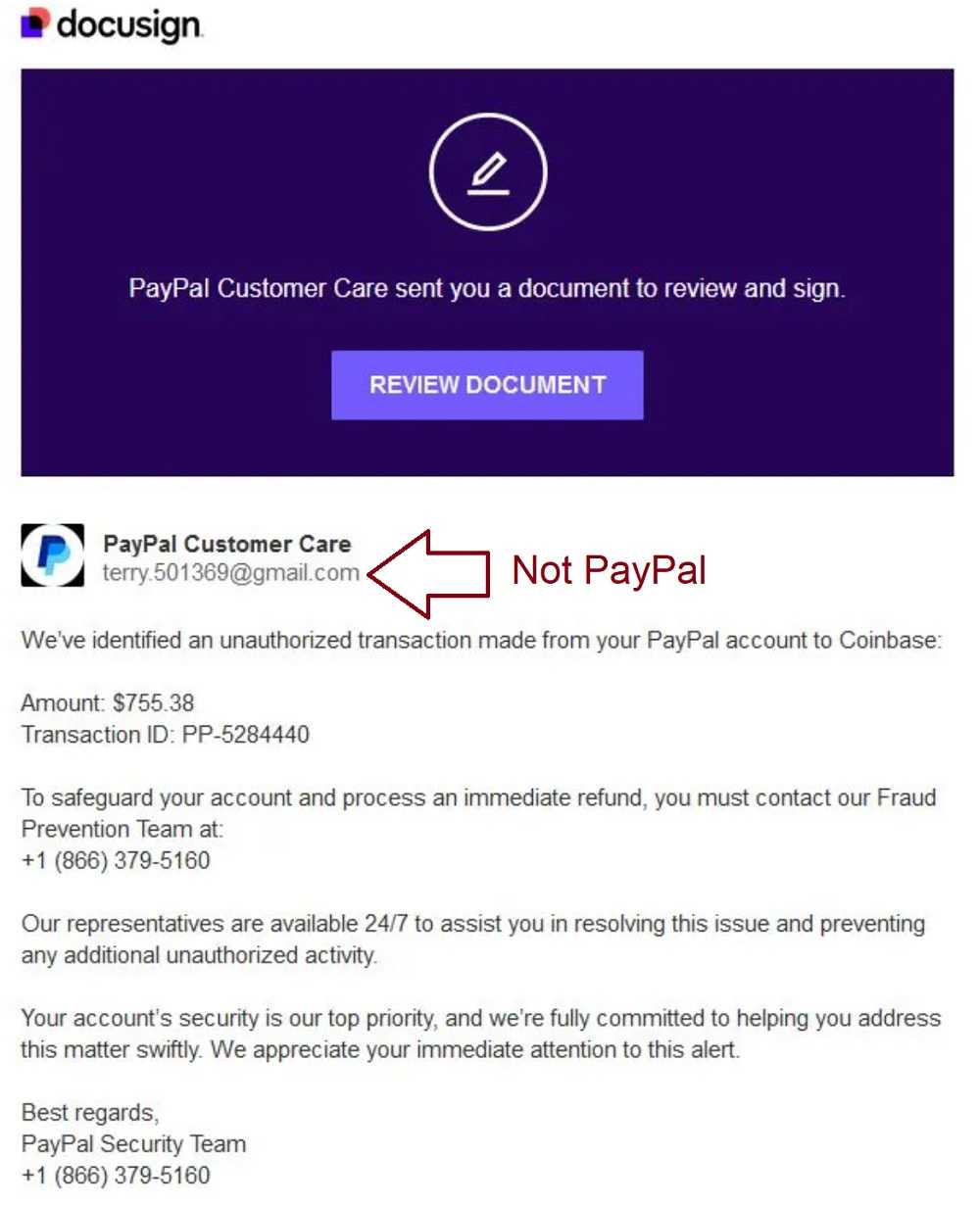
Phishing’s Suspect Red Flags

Keep these phishing red flags in mind for all your emails, especially when fraud and urgency are the lures.

  • Emails about urgency or fraud with your account, any account, are always phishing red flags.
  • Unexpected emails, especially those with attachments, are always phishing red flags. The email and attachments could be fraudulent and/or carry malware, so don’t click on them.
  • Beware email subjects sounding too good (or bad) to be true. Extreme subject lines (you won a car in a contest you didn’t enter or maybe about financial fraud) are always phishing red flags.
  • Emails from a trusted source such as PayPal or other financial accounts, especially those requesting your PII, are always phishing red flags.
  • Carefully inspect the URL and domain names. Scammers do their best to make them look identical, only they’re not. Watch for sneaky subs like numbers in place of letters. Different spellings are always a phishing red flag.

With any doubt about whether or not an email is legitimate, there’s another way to find that out. Use the bookmark or type-in the URL you always use, and never use contact information provided in the email. Once safely inside your PayPal (or other) account, check for any recent transactions. You can bet there’s nothing showing, and that’s always a phishing red flag.


The PayPal No-Phish Phishing Scam

Scams & Phishing

The PayPal No-Phish Phishing Scam

It’s not your typical email phishing scam, but then cybercriminals are always looking for new ways to swindle us. And we’ve seen many warnings about PayPal scams lately. Yet another one, this PayPal “No-Phish” email phishing attack is rampant. Scammers are tricking PayPal users into handing over their accounts thanks to this highly sophisticated phishing scheme. The way this no-phish phish is constructed, it also gets beyond the typical phishing detection software. READ FULL STORY

Cash App Flip Scams Make Big Promises Using Your Money

Scams & Phishing

Cash App Flip Scams Make Big Promises Using Your Money

Peer-to-peer payment (P2P) systems have exploded in popularity, with more than 113 million users estimated in the U.S. alone. With the number of P2P users growing, Cash App, the highly popular P2P platform for sending and receiving money on your smartphone, has the attention of hackers. Scammers are using a “flip scam” to steal Cash App user funds. If you use this app or are considering it, knowing how to spot this scam is as good as money in the bank – or Cash App! READ FULL STORY

A Check on the Safety of P2P Apps

Mobile Security

A Check on the Safety of P2P Apps

There are so many payment apps out there; PayPal, Venmo, and Zelle, for instance and perhaps you’ve probably wondered: Are these apps actually safe? The short answer—yes, if you’re careful. While most P2P apps use encryption to protect your data, scammers are constantly looking for new ways to trick users into giving up their money. And because these apps are often linked directly to your bank account, one mistake can be very costly. But just knowing how to spot potential scams and fraud can help you use them safely. READ FULL STORY

Avoiding Peer To Peer Payment Scams

Mobile Security

Avoiding Peer To Peer Payment Scams

Peer to Peer (P2P) payment networks like Zelle, PayPal,­ and CashApp have taken the world by storm, and “Pay Yourself” scams are a result. Avoiding these scams means knowing one when you see it, and how to navigate safely around it. These scams are phishing attacks at their foundations, and they typically begin with a scammer impersonating your financial institution. Using email text or phone, their urgent message is about a fraud alert on your account, and they’re here to help. Once you bite, you’ll get a call from the scammer. READ FULL STORY

Online And Mobile Payment Option Security

Your Security

Online And Mobile Payment Option Security

Most of us have heard of the various payment systems that allow us to pay almost anyone without writing the old-fashioned paper check. Now, we can pay nearly anyone, residing anywhere in the world with just a few taps on the keyboard or touch of an app. The three best known are PayPal, Venmo, and Zelle and all of them are increasingly being used for business purposes. PayPal and Venmo work essentially the same way and are actually owned by the same company, though there are some small differences in how they are used. READ FULL STORY


Close
Fraud News & Alerts!

Keep up with the latest cyber security news through our weekly Fraud News & Alerts updates. Each week you will receive an email containing the latest cyber security news, tips and breach notifications.


You're all set!

You will receive your first official security update email within the next week.

A welcome email has also just been sent to you. If you do not receive this email within the next few minutes, please check your Junk box or spam filter to confirm our emails are not being blocked.


Help  
Enter any word or words you like.        

The email newsletter will arrive from news@stickleyonsecurity.com


Loading
Please wait...